First up, Jev is amazing. I'm not going to explain Jev. I'm going to explain how to cleanly add Jev to your project so you can Jev with style.
Jev with style means your Jev questions live in a UI anyone on the team can edit, and the edits reach the running app in seconds. No pull request, no deploy, no restart. Here's one of the questions my app asks about every support email:
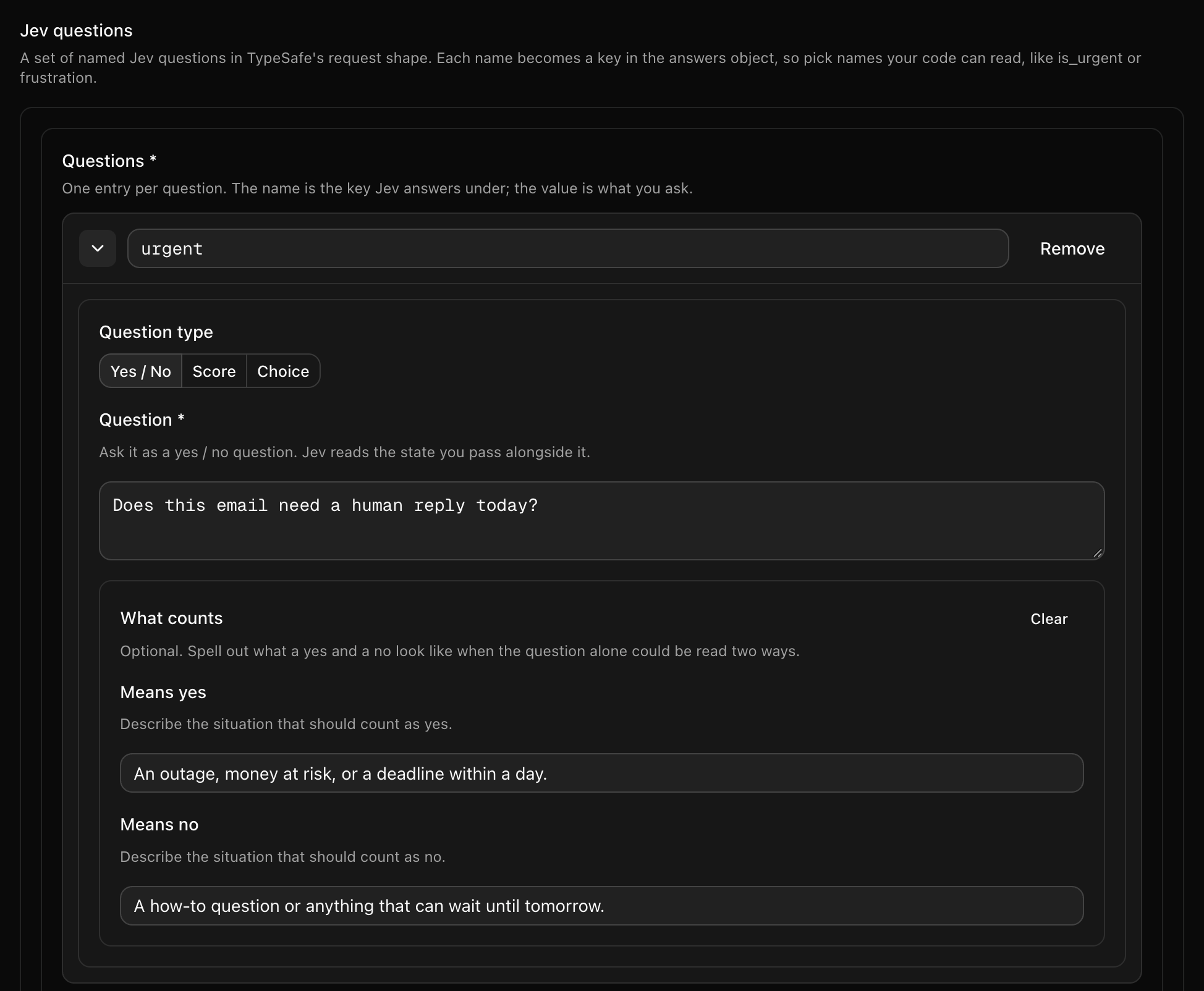
Reword it, tighten what counts as yes, or flip it to a score, then save. The running app picks up the new question over SSE about 12 seconds later, with no restart.
We're going to keep our schemas separate from our configs, and our configs separate from our code. Then we're going to give each customer its own questions, change those questions while the app is running, and be clear about which changes are safe to make that way and which ones aren't.
TL;DR — A Jev call is a set of named questions and a model name. Keep them in Quonfig config instead of in code, and you get a form your teammates can edit, with edits that reach running code in seconds and no deploy. Paste one JSON Schema, keep your questions in a config bound to it, and pass them straight to
typesafe.systemOne. The generated types match Jev's own, so there's no cast. You also get a different question set per customer and a per-environment model pin. Everything below ran against real Jev, and the code is in one repo.
Handing this to an agent? Point it at this post and at Using Jev with Quonfig. The schema, the config JSON and the code are all here in full.
What you get for putting Jev in config
The plain way to add Jev is to write the questions inline where you call it:
const result = await typesafe.systemOne({
  state: { email },
  model: "jev-1.13.0",
  questions: {
    urgent: noul(
      "Pro-plan customer. Does this email need a human reply today?",
    ),
    frustration: score("How frustrated is the customer who wrote this email?", [
      "Calm",
      "Annoyed but civil",
      "Angry or threatening to leave",
    ]),
  },
});
if (result.answers.urgent.noul >= 0.8) pageOnCall(email);
It works. But every word in there is something you'll want to change next Tuesday, and every change is a pull request, a review, and a deploy. The wording. The rubric. A third question. The model pin. The pro that should have been a variable. And your biggest customer will want different questions than everyone else.
Move the questions and the model into config and here is what you get, with no new Jev features and no new Quonfig features:
- Edit the questions in a form. Reword one, add one, turn a yes/no into a score. Save, and running code asks the new questions seconds later. No deploy.
- Different questions per customer. Enterprise customers get a churn question and SLA wording. One big account gets a language check. A rule on the customer's plan or key picks the set.
- Pin the model per environment. Production stays on a pinned version (such as
jev-1.13.0) while staging ridesjev-latest, without copying the questions. - Cleaner, typed code. The call site shrinks to plumbing, and the questions reach Jev with Jev's own types. No cast.
The rest of this post is how, with the one honest caveat: config can change the questions on the fly, but your code can only act on answers it knows about. We'll be precise about where that line is.
The workspace is a directory
Quonfig's storage is a directory of JSON files in a git repo. That's the whole thing. Here's the part of it this post uses:
quonfig/
├── quonfig.json                          # workspace metadata: environments
├── schemas/
│   └── jev-questions.json                # the SHAPE of any Jev question set (JSON Schema)
└── configs/
    ├── support.triage.questions.json     # the VALUES: today's questions
    └── jev.model.json                    # which Jev model to call
Each file's name is its key. Each file lives in the directory matching its type. Dynamic values go in configs/, JSON Schemas in schemas/, flags in feature-flags/. There are also segments/ and log-levels/ directories that this post doesn't need.
You can use this directory with no account at all. The MIT-licensed SDK reads it straight from disk, qfg verify checks it offline, and qfg generate emits typed accessors from it. That path is documented in Open Source / Fully Local. Push the same directory to Quonfig cloud and you get a UI that edits the files, real-time delivery to running instances, and audit history. The code is identical either way.
Schema versus config
This is the part that confused people when I first showed it, so let's be careful.
A schema describes the shape of a value: which fields exist, what type each one is, what bounds it has. It's a plain JSON Schema document in schemas/. It does not contain a single question.
A config holds the actual values: the question text, the rubric, the labels. It's a JSON file in configs/ with a schemaKey field that points at its schema.
If you're a TypeScript person: the schema is the type, the config is the value. Code compiles against the type. The value is data that arrives at runtime.
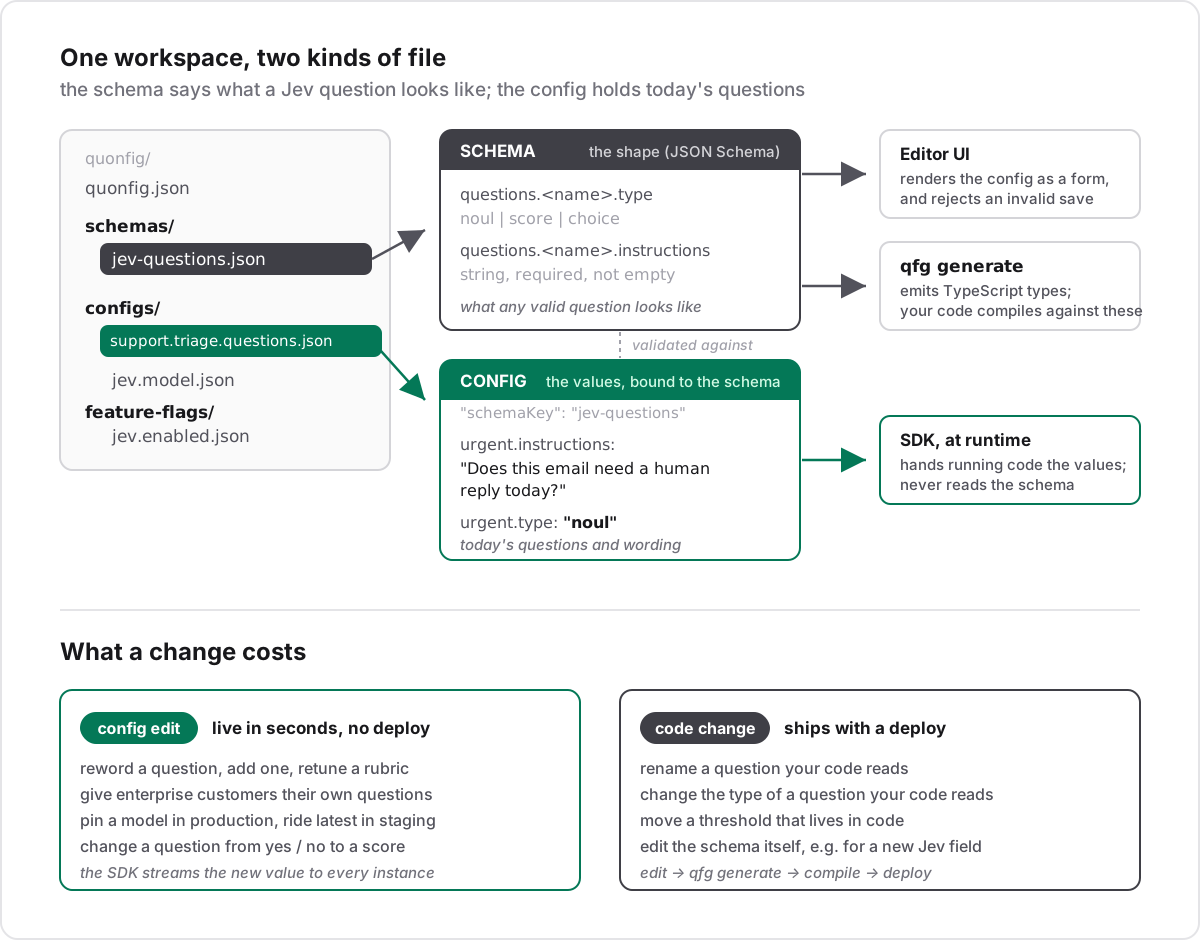
The schema feeds two things. The editor, which renders any config bound to it as a form and refuses to save a value that breaks the shape. And qfg generate, which turns it into TypeScript types your code compiles against.
The config feeds one thing: the SDK, which hands your running code the current values. The SDK never reads the schema. Keep that in mind for the "what can I change live" section, because it's the reason schema edits can never crash a running process.
Step 1: paste the schema
Every Jev call has the same shape: a map of named questions, where each question is a yes/no (noul), a score or a choice. So one JSON Schema covers all of them, and you don't write it. Copy it from Using Jev with Quonfig, then in the app go to Schemas, click + Add Schema, set the key to jev-questions and paste.
It's about 120 lines, mostly titles and descriptions the form shows as labels and hints. Expand it to copy, or have your agent take it from the docs page.
schemas/jev-questions.json
{
  "$schema": "https://json-schema.org/draft/2020-12/schema",
  "title": "Jev questions",
  "description": "A set of named Jev questions in TypeSafe's request shape. Each name becomes a key in the answers object, so pick names your code can read, like is_urgent or frustration.",
  "type": "object",
  "required": ["questions"],
  "additionalProperties": false,
  "properties": {
    "questions": {
      "type": "object",
      "title": "Questions",
      "description": "One entry per question. The name is the key Jev answers under; the value is what you ask.",
      "minProperties": 1,
      "propertyNames": {
        "pattern": "^[a-zA-Z][a-zA-Z0-9_]*$"
      },
      "additionalProperties": {
        "oneOf": [
          {
            "title": "Yes / No",
            "description": "Jev answers with a probability between 0 and 1 that the answer is yes.",
            "type": "object",
            "required": ["type", "instructions"],
            "additionalProperties": false,
            "properties": {
              "type": {
                "const": "noul",
                "title": "Question type"
              },
              "instructions": {
                "type": "string",
                "title": "Question",
                "description": "Ask it as a yes / no question. Jev reads the state you pass alongside it.",
                "minLength": 1
              },
              "criteria": {
                "type": "object",
                "title": "What counts",
                "description": "Optional. Spell out what a yes and a no look like when the question alone could be read two ways.",
                "additionalProperties": false,
                "properties": {
                  "true": {
                    "type": "string",
                    "title": "Means yes",
                    "description": "Describe the situation that should count as yes."
                  },
                  "false": {
                    "type": "string",
                    "title": "Means no",
                    "description": "Describe the situation that should count as no."
                  }
                }
              }
            }
          },
          {
            "title": "Score",
            "description": "Jev answers with an expected score on the rubric: 0 is the first line, 1 the second, and so on. It can land between levels, so 1.5 means between the second and third line.",
            "type": "object",
            "required": ["type", "instructions", "criteria"],
            "additionalProperties": false,
            "properties": {
              "type": {
                "const": "score",
                "title": "Question type"
              },
              "instructions": {
                "type": "string",
                "title": "Question",
                "description": "What is being rated. The rubric below defines the scale.",
                "minLength": 1
              },
              "criteria": {
                "title": "Rubric, lowest first",
                "description": "One line per level, lowest first. The first line is level 0, the second is level 1. At least two lines.",
                "type": "array",
                "minItems": 2,
                "items": {
                  "type": "string",
                  "title": "Level",
                  "description": "What this level looks like, in a sentence."
                }
              }
            }
          },
          {
            "title": "Choice",
            "description": "Jev picks exactly one of the labels and answers with its name.",
            "type": "object",
            "required": ["type", "instructions", "criteria"],
            "additionalProperties": false,
            "properties": {
              "type": {
                "const": "choice",
                "title": "Question type"
              },
              "instructions": {
                "type": "string",
                "title": "Question",
                "description": "What to classify. The labels below are the only possible answers.",
                "minLength": 1
              },
              "criteria": {
                "title": "Labels",
                "description": "The label is the name Jev answers with; the text tells Jev when to pick it. At least two labels.",
                "type": "object",
                "minProperties": 2,
                "maxProperties": 255,
                "additionalProperties": {
                  "type": "string",
                  "title": "When to pick it",
                  "description": "Describe the case this label covers."
                }
              }
            }
          }
        ]
      }
    }
  }
}
The three question types come back differently:
- Yes / No (
noul) comes back as a probability between 0 and 1 that the answer is yes. - Score grades against a rubric you write lowest first. It comes back as an expected value on that rubric: 0 is the first line, 1 the second, and a number like 1.4 means between the second and third. It's a float, not a position.
- Choice picks exactly one of your labels and comes back with its name.
Every question needs its question text. That isn't fussiness: Jev rejects a yes/no with no instructions and no criteria. I tried it, and got back 400 Noul question must have criteria or instructions: urgent. The schema catches it at save time instead.
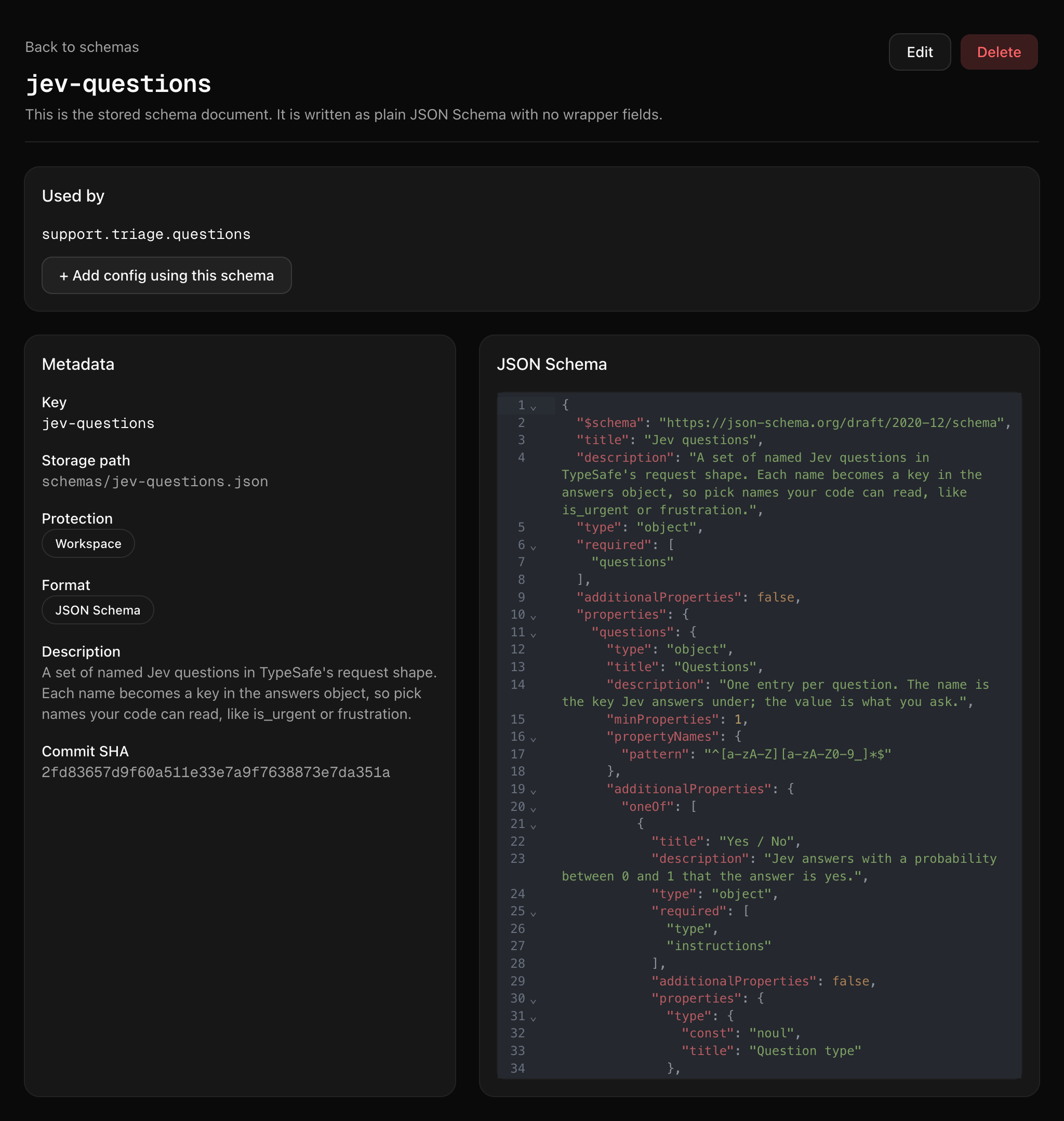
Nothing in this file is a question. It only says what a valid set of questions looks like. It doesn't name a single question either, so you paste it once and every Jev call in your codebase can use it.
Step 2: write the questions in the form
On the schema's page, click + Add config using this schema. I named mine support.triage.questions: the questions we ask Jev about every inbound support email.
Because the config is bound to the schema, the app renders it as a form. Each question is a card with a Yes / No, Score and Choice switcher. A score gets an ordered list of rubric lines. A choice gets a list of labels, each with a description that tells Jev when to pick it. The Raw JSON tab next to Form shows the same value as JSON, for pasting. Every label and hint in the form comes from the schema you pasted. Nothing in the app is Jev-specific.
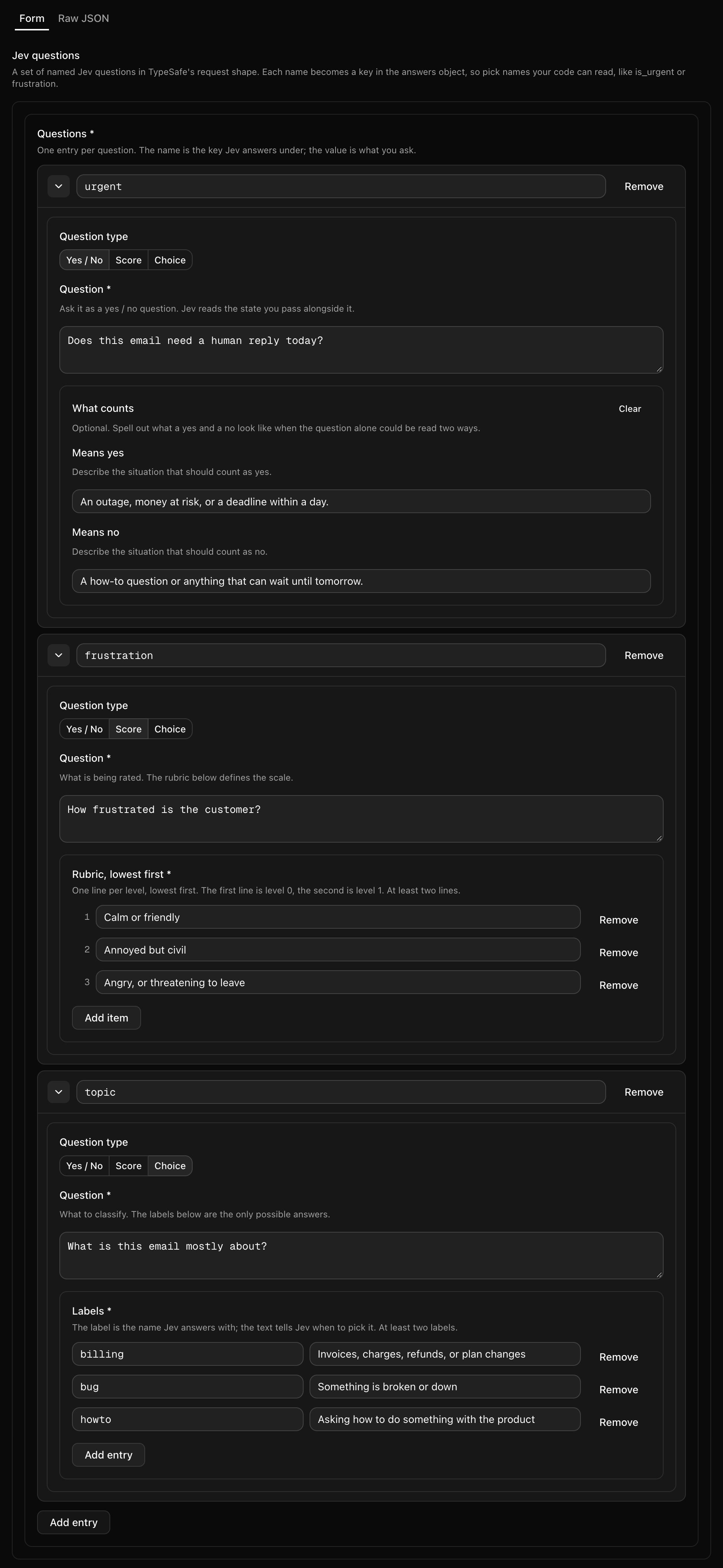
This is the whole editing surface for the questions. Whoever rewords a question doesn't need to know what a noul is.
Here's the value I saved, three questions, one of each type:
{
  "questions": {
    "urgent": {
      "type": "noul",
      "instructions": "Does this email need a human reply today?",
      "criteria": {
        "true": "An outage, money at risk, or a deadline within a day.",
        "false": "A how-to question or anything that can wait until tomorrow."
      }
    },
    "frustration": {
      "type": "score",
      "instructions": "How frustrated is the customer?",
      "criteria": [
        "Calm or friendly",
        "Annoyed but civil",
        "Angry, or threatening to leave"
      ]
    },
    "topic": {
      "type": "choice",
      "instructions": "What is this email mostly about?",
      "criteria": {
        "billing": "Invoices, charges, refunds, or plan changes",
        "bug": "Something is broken or down",
        "howto": "Asking how to do something with the product"
      }
    }
  }
}
The app checks every save against the schema, and so do the API, qfg verify, qfg push, and a plain git push to the workspace repo. A blank question or a one-line rubric is rejected with the field that's wrong.
One small sibling rounds it out. jev.model is a string config holding the model name, so production can be pinned to a version (such as jev-1.13.0) while staging rides jev-latest.
Step 3: target per customer
Here's where config starts paying for itself. A config value can differ by rule, and a rule can match anything in the context your code passes. Our code passes the customer: { customer: { key, plan, country } }.
I added two rules above the default:
customer.planis one ofenterprise.urgentasks about a 4-hour reply ("Does this email need a human reply within 4 hours, per the enterprise SLA?"), and there's a fourth question,churn_risk: "Is this account at risk of cancelling or not renewing?"customer.keyis one ofglobex. Globex is a German customer with a contract.topicgets acontractlabel, and there's alanguagechoice:de,enorother.
Everyone else gets the default three.
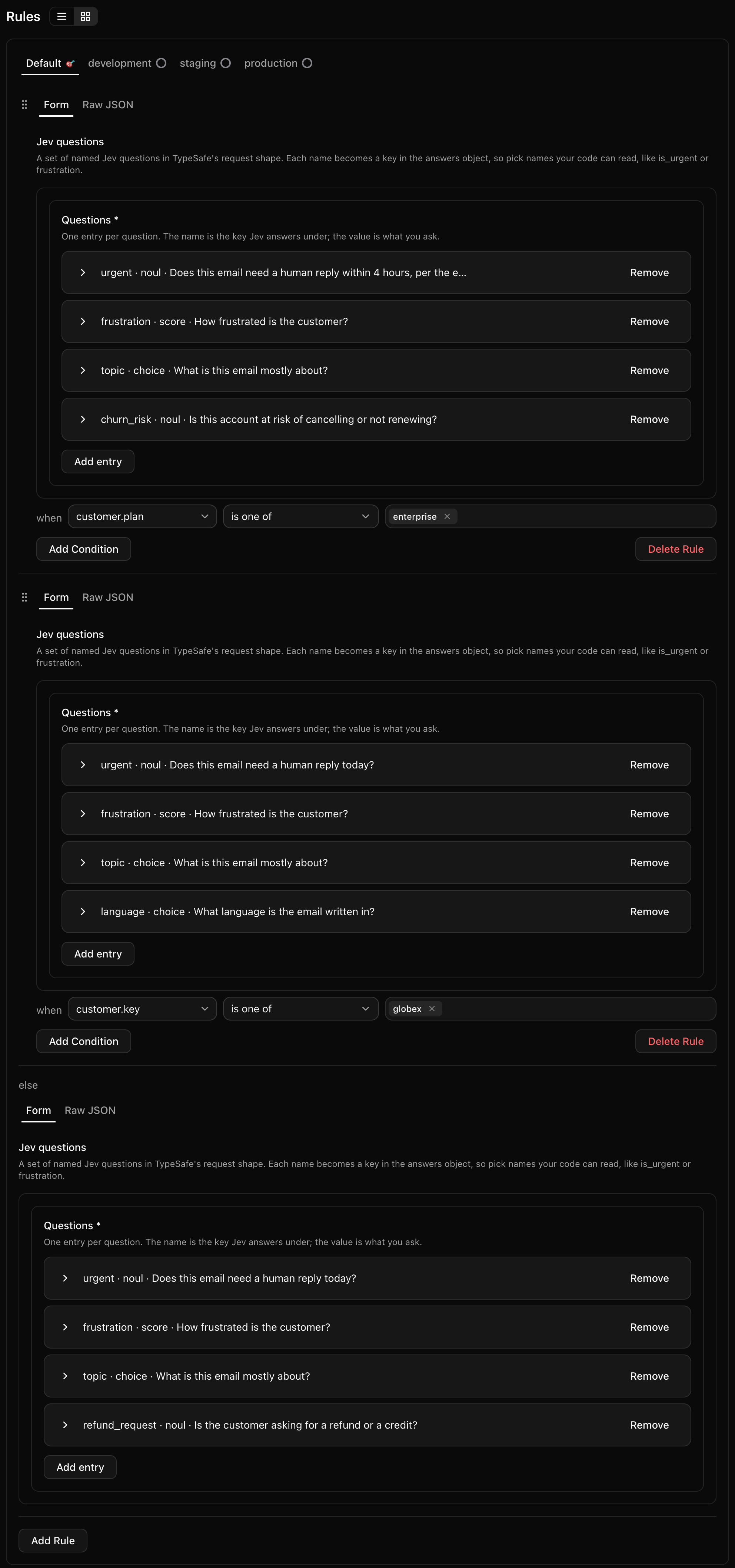
One thing to know, plainly: each rule holds its own full copy of the question set. The enterprise rule doesn't add churn_risk on top of the default. It is four questions, written out: the default's three, reworded where needed, plus churn_risk. What you see in a rule is exactly what Jev gets for that customer, with nothing merged in from elsewhere. The flip side is that a change to the default doesn't reach the rules. You'll see that in the next step.
A new rule starts empty. The quick way to fill it is to copy the default's value from its Raw JSON tab, paste it into the new rule's Raw JSON tab, and then edit in Form.
Step 4: change it while it runs
The demo repo has a live runner, examples/6-live/triage-live.ts. It sends three sample emails, one per customer, through real Jev and prints the answers. With --watch it keeps running and re-runs whenever the config changes.
With it running, I added a fourth question to the default in the app: refund_request, a yes/no, "Is the customer asking for a refund or a credit?". I clicked Save at 17:08:35 UTC. The running process logged the update over SSE about 12 seconds later:
[quonfig] config update received 2026-10-01T17:08:48.298Z
The next run asked Initech, a default customer, the new question. No restart, no deploy. The app's Audit Trail records the change by field:

Acme and Globex were not asked refund_request, because their rules hold their own copies. That's how it works, and it's the right result for a per-customer change. For a change every customer should get, make it in each rule too.
Step 5: the code
Generate typed accessors with qfg generate:
qfg generate --targets node-tsYou need @quonfig/cli 0.2.0 or later. From that version, the generated type for a config bound to jev-questions is Jev's own question union, so the questions pass to systemOne with no cast. This is examples/6-live/triage-typed.ts:
import { Quonfig } from "@quonfig/node";
import { TypeSafeClient } from "@typesafe-ai/sdk";
import { QuonfigTypesafeNode } from "./generated/quonfig-server";

const client = new Quonfig({ sdkKey: process.env.QUONFIG_BACKEND_SDK_KEY! });
await client.init();
const quonfig = new QuonfigTypesafeNode(client);
const typesafe = new TypeSafeClient(); // reads TYPESAFE_API_KEY

export async function triage(
  email: string,
  customer: { key: string; plan: string; country: string },
) {
  const ctx = { customer }; // the rules target customer.plan and customer.key
  const { questions } = quonfig.supportTriageQuestions(ctx);
  const { answers } = await typesafe.systemOne({
    state: { email, plan: customer.plan, country: customer.country },
    model: quonfig.jevModel(ctx),
    questions, // no cast
  });
  return answers;
}
Two things to notice. The context is what makes targeting work: call supportTriageQuestions() without it and every customer gets the default. And there are no {{placeholders}} in the questions. Facts like the plan and country go in the state, next to the email, and Jev reads them there.
Here's the live runner against real Jev (jev-1.13.0), with the config as it stood after step 4:
$ npx tsx examples/6-live/triage-live.ts

Acme Corp (enterprise, US)  232ms
  churn_risk       P(yes)=0.95
  frustration      score=2
  topic            choice=bug
  urgent           P(yes)=0.94
Globex GmbH (pro, DE)  159ms
  frustration      score=0.47
  language         choice=de
  topic            choice=billing
  urgent           P(yes)=0.18
Initech (free, US)  143ms
  frustration      score=0
  refund_request   P(yes)=0.01
  topic            choice=howto
  urgent           P(yes)=0.05
Acme's checkout is down, they were charged twice, and they're threatening to leave: urgent, angry, churn risk. Globex wrote in German about an invoice that doesn't match their contract, due by the end of the week. Initech wants a CSV export, no rush. Each customer was asked its own set, in one call each. Over two runs the six calls took 143 to 232 ms.
Look at Globex's frustration: 0.47. A second run gave 0.5. That's between "Calm or friendly" (0) and "Annoyed but civil" (1), which is about right for a firm but polite email. Acme's 2 is the top of the rubric, and it's still a float that happens to be whole. On a two-level rubric I tried, Jev answered 0.93. So never test a score with ===. Compare it with >=: frustration >= 1.5 means "closer to angry than annoyed".
Acting on the answers
The code above never names a question, and that's on purpose: the questions are config. To act on an answer, don't hardcode the threshold either. Put each answer on the context and let a flag rule decide. This is from examples/4-all-config, which uses the same jev-questions schema:
// In triage(): each answer becomes a number (or label) on the context.
const jev: JevContext["jev"] = {};
for (const [name, answer] of Object.entries(result.answers)) {
  if (answer.type === "noul") jev[name] = answer.noul;
  else if (answer.type === "score") jev[name] = answer.score;
  else jev[name] = answer.choice;
}
return { user, jev };

// Both thresholds live in flag rules.
export function decide(config: QuonfigTypesafeNode, ctx: JevContext) {
  return {
    // rule: jev.urgent >= 0.8
    paged: config.oncallPage(ctx),
    // rule: jev.frustration >= 1.5 AND user.plan not free
    retentionOffer: config.promoRetention10Pct(ctx),
  };
}
The 0.8 and the 1.5 are rules you can move in the UI, and the rule trace says exactly why a customer got paged. With the answers above, Acme (urgent 0.94) would page and Globex (0.18) and Initech (0.05) would not. The fuzzy judgment happened once, when the email arrived. The flag check is a synchronous in-memory read. Don't put the model inside the flag. Put its answer next to the flag.
What you can change on the fly, and what you can't
This is the question everyone asks: can you just change it while it's running? Here's exactly what happens.
Three things read the workspace, and they read different parts of it:
- Running SDKs read configs. They never read
schemas/. They hand your code whatever JSON is in the config. - The editor reads both. It renders the form from the schema and rejects a save that violates it.
qfg generatereads both. It turns the schema into types.
So a config edit is live everywhere in seconds, and the schema is what keeps it safe. The editor won't let anyone save a blank question, a one-line rubric, or a choice with one label. Everything the schema leaves open is fair game at any hour:
| Change | Where | Deploy? |
|---|---|---|
| Reword a question, rewrite what counts as yes and no | config | no |
| Add or remove a question | config | no |
| Change a question's type (yes/no to score) | config | no |
| Add, remove, or reword rubric lines or choice labels | config | no |
| Give a plan or a customer its own question set | config | no |
| Pin a model in production, ride latest in staging | config | no |
| Move a threshold that lives in a flag rule | flag | no |
The line is your code. Config can't teach running code about anything new. If your code, or a flag rule, reads an answer by name, that name and its type are part of the contract:
| Change | Why it's a code change |
|---|---|
| Rename a question your code or a flag reads | The code reads undefined for the old name, and the flag rule stops matching |
| Change the type of a question your code reads | The answer changes shape: a probability, a score, or a label |
| Move a threshold written in code | It's a number in code |
Edit the jev-questions schema | The generated types change, so qfg generate and a deploy |
The first row is the one to watch. The schema is generic, so it can't know which names your code relies on. Renaming urgent in the form saves fine. Treat the names your code and flags read as part of the contract, and keep a test that asserts they exist in the config.
The last row should be rare. The schema mirrors Jev's request shape (@typesafe-ai/sdk 0.6.0), so you only touch it when Jev's API changes. And because running SDKs ignore the schema, editing it can never crash a process.
Run it yourself
The demo repo runs with no keys and no account:
git clone https://github.com/quonfig/jev-with-style
cd jev-with-style
npm install
npm run demo
That runs the version in this post: it reads a copy of the workspace above, the jev-questions schema plus support.triage.questions with the enterprise and Globex rules, from examples/6-live/quonfig on disk, and a local mock stands in for Jev. The mock is handed to the real TypeSafe client as its fetch, so the request the SDK builds is exactly what production sends; only the answers are keyword heuristics. Set TYPESAFE_API_KEY and the same command uses real Jev.
To run the version in this post, live from Quonfig cloud:
- Paste the
jev-questionsschema into your workspace, as in step 1. - Click + Add config using this schema, name it
support.triage.questionsand add your questions. Add ajev.modelstring config set tojev-latest. - Optionally, add rules on
customer.planorcustomer.key. - Run the live runner with a backend SDK key for that workspace and your Jev key:
export QUONFIG_BACKEND_SDK_KEY=...
export TYPESAFE_API_KEY=...
npm run live -- --watch
Then edit a question in the app and watch the next run pick it up. The code didn't change.
Recap: everything in its place
None of this required a new Jev feature or a new Quonfig feature. It required putting each thing where it belongs:
- The schema in
schemas/says what a Jev question looks like. You paste it once, and it changes only when Jev's API does. - The config in
configs/holds today's questions, per customer. It changes whenever you like. - The code passes the context and the questions to Jev, and acts on the answers it knows about. Nothing else.
Jev's typed questions are the cleanest "prompts are config" case I've seen: small, structured, diffable, and they come with a probability that begs for a threshold. That threshold should never have been a hardcoded 0.8.
Related: Using Jev with Quonfig · How to roll out a new LLM prompt to 10% of users · Open Source / Fully Local
Want to try it?
Quonfig stores your config in git. Feature flags, dynamic config, log levels, and secrets — all as files you own.